Dell 14 Premium Review: A Top-Tier Laptop Redefining Excellence
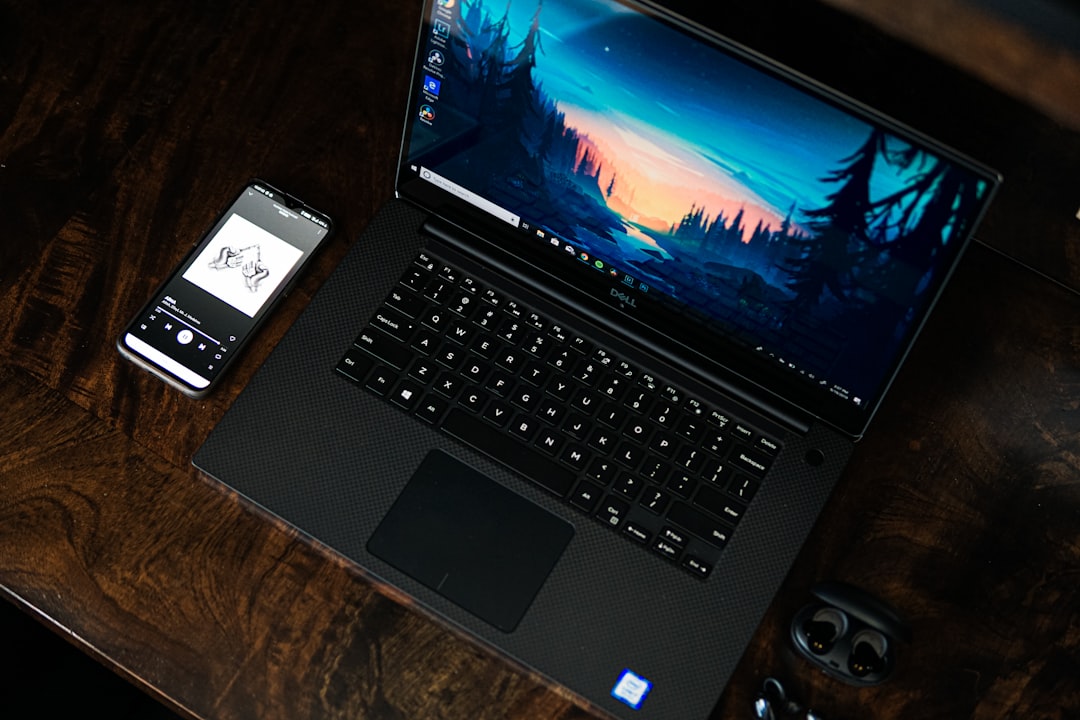
The Dell 14 Premium combines a sleek design, powerful specs, and an OLED display to deliver one of the best Windows laptops in 2024.
Introducing the Dell 14 Premium
Dell has rebranded its high-end XPS line under the new "Premium" series, and the Dell 14 Premium is the standout star of this fresh approach. Combining elegant design, cutting-edge hardware, and an OLED display that’s simply stunning, it sets a high bar for laptops in 2024. If you're in the market for a device that balances power, portability, and style, the Dell 14 Premium warrants serious consideration.
This laptop is ideal for those seeking reliability, strong performance, and all-day battery life. Whether you’re a professional or a student, the Dell 14 Premium is designed to meet varied needs.
Unparalleled Design: Premium Look and Feel
The first thing you'll notice about the Dell 14 Premium is its unibody aluminum design, a hallmark of high-end laptops. Borrowing from the XPS design philosophy, it comes with a sleek, solid chassis. At just 0.71 inches thick and weighing 3.79 pounds, it’s portable, yet it exudes durability.
One unique design feature is the built-in glass trackpad and palm rest, crafted from Gorilla Glass 3. This flush design area feels luxurious under your palms as you type or navigate. Complimented by capacitive buttons, the keyboard seamlessly blends into the chassis while maintaining a comfortable key travel for long typing sessions.
The hinge design shines here too—sturdy and smooth with no wobble. Small touches like the placement of the fingerprint scanner on the power button add convenience without cluttering the layout.
Key design highlights:
- Sleek unibody aluminum construction
- Gorilla Glass 3 touchpad and palm rest
- Sturdy hinge with smooth motion
- Thin bezels surrounding a 14.5-inch screen
Stunning 3.2K OLED Display
The crown jewel of the Dell 14 Premium is undoubtedly its 3.2K OLED touchscreen panel. With razor-thin bezels and a pixel density of 220 PPI, everything on this screen looks sharp and vibrant. It covers 100% of the DCI-P3 color gamut, making it ideal for creative professionals who work with photo or video editing.
For casual users and content consumers, the OLED display offers deep blacks, high contrast ratios, and vivid colors that make movies, YouTube videos, or general browsing an absolute pleasure to watch. While a slightly cheaper IPS option is available, the OLED version is worth the extra cost.
Display specs:
| Feature | Specification |
|---|---|
| Resolution | 3.2K (3200 x 2000) |
| Panel Type | OLED |
| Color Coverage | 100% DCI-P3 |
| PPI | 220 |
| Touchscreen | Yes |
Powerful Performance
Under the hood, the Dell 14 Premium is powered by Intel’s Core Ultra 7 processor paired with integrated Intel Arc graphics. The laptop comes with 16GB of RAM, which is sufficient for most users, even those handling moderately intensive tasks such as video editing or 3D modeling. Additionally, its 1TB of storage provides ample space for files, apps, and multimedia content.
Compared to its predecessor, the XPS 14, the Dell 14 Premium is up to 33% faster for daily tasks and approximately 21% faster in creative applications. Whether you’re multitasking between work and entertainment or doing light gaming and design work, the laptop can handle it all with ease. The inclusion of AI-enhanced workflows with the Neural Processing Unit (NPU) adds even more speed, making it great for tasks like caption generation and basic design masking.
Connectivity and Ports
Though minimalist, the port selection covers essentials. Here’s what you get:
- 3 Thunderbolt 4 ports: Ideal for fast data transfers, external monitors, and charging
- MicroSD card slot: Useful for creators who need quick access to extra storage
- Headphone jack: A staple for wired audio enthusiasts
For those needing additional ports like HDMI or USB-A, Dell offers an add-on dongle featuring HDMI 2.1 and USB-A connectivity.
All-Day Battery Life
Despite the power-hungry OLED display and robust hardware, the Dell 14 Premium delivers consistent all-day battery life. Early hands-on tests indicate the laptop easily lasts throughout a workday on a single charge, depending on the chosen configuration.
This makes it perfect for professionals and students who are constantly on the go, providing peace of mind about running out of power.
Battery performance highlights:
- Lasts a full day with moderate usage
- Energy-efficient components
- Configurations slightly affect battery life; OLED may consume more
Practical Takeaways
- Best for Display Quality: Opt for the OLED screen version for stunning visuals.
- Performance Sweet Spot: The Intel Core Ultra 7 and 16GB RAM hit the ideal balance for productivity and light creative work.
- Portability Tested: Despite premium materials, it remains relatively lightweight and slim, making it travel-friendly.
- Versatile Connectivity: Thunderbolt 4 ensures compatibility with modern accessories, while an add-on dongle covers older ports.
Conclusion
The Dell 14 Premium stands tall not just in Dell’s lineup but across the broader Windows laptop market. From its aluminum unibody design to its breathtaking 3.2K OLED display and standout performance, it excels in almost every aspect. While the device is priced as a premium offering, the value it brings justifies the investment.
If you’re looking for a dependable yet powerful laptop that can handle everything from daily tasks to creative workflows, the Dell 14 Premium deserves to be at the top of your list.
FAQ
1. Is the Dell 14 Premium good for video editing?
- Yes, with its Core Ultra 7 processor, Intel Arc graphics, and OLED screen displaying 100% DCI-P3 color coverage, it’s well-suited for video editing workflows.
2. How heavy is the Dell 14 Premium?
- The laptop weighs 3.79 pounds, making it portable yet sturdy.
3. Does the Dell 14 Premium have sufficient ports?
- While port selection is minimal (3 Thunderbolt 4 ports, a microSD slot, and headphone jack), Dell provides a dongle for HDMI 2.1 and USB-A.
4. What’s the battery life like?
- It delivers all-day battery performance, though OLED panel configurations may slightly reduce longevity.
5. Should I choose the OLED display over IPS?
- The OLED panel offers significantly better visuals, making it ideal for content consumption and creative professionals.
Comments
Loading comments…


